Restored from the project wiki (we.riseup.net), which is no longer online.
HTTPS everywhere is an extension for various browsers developed by the EFF to improve the security of your browsing.
It is really simple to install, and after installation you will not have to do anything: everything happens automatically.
The communications your browser makes with the sites you connect to can happen in the clear or in encrypted form. Communications in the clear can be read easily by anyone sharing the connection with you (for example a colleague or a family member), by your provider (fastweb, alice, infostrada…) and of course by the police authorities. Encrypted connections are much more secure (see the appendix at the bottom, “SSL & Certification Authority”, to find out more)
HTTPS Everywhere tries to use encrypted communications whenever possible, and it supports a great many sites
The extension exists for firefox and chrome. If you have neither of these browsers, install them: you will not miss internet explorer or Safari.
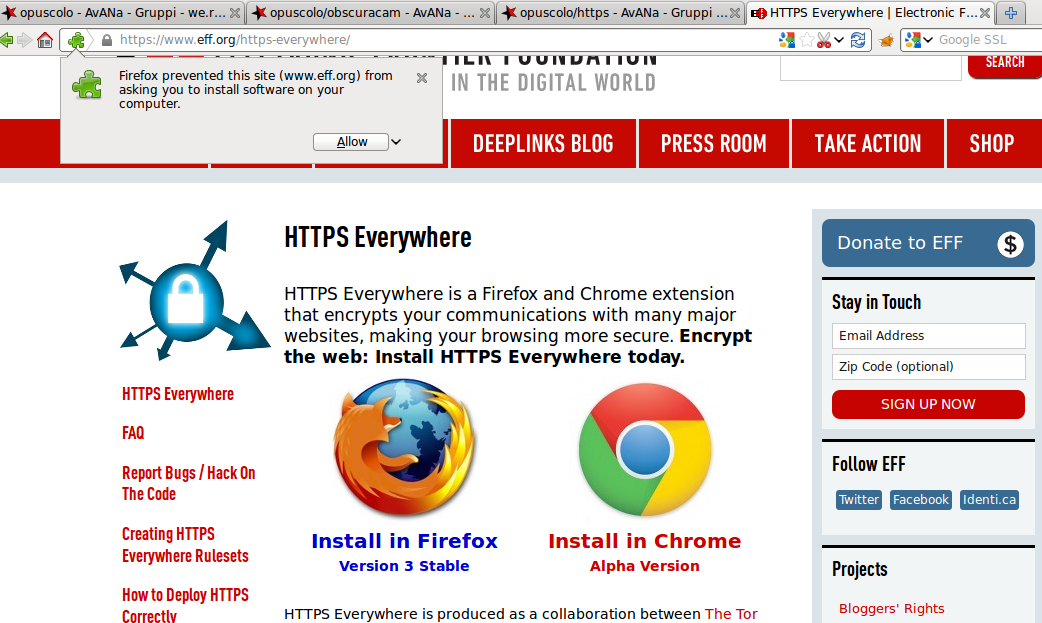
Firefox must be closed and reopened before the extension takes effect.
For chrome, there is no need to close and reopen: you are already using https everywhere
When you use an encrypted communication, you want to be sure that you are talking to exactly the site you mean to talk to, and not to a third party.
But how do you tell the legitimate owner of the site apart from someone pretending to be them?
Browsers use a method of “certification”: every HTTPS site has an identity “certificate”, which can be signed by other companies, called CA. Since anyone could set up a CA and sign whatever they like, it comes down to deciding which CAs are trustworthy and which are not.
Browsers are disappointing in this respect: they include practically anyone as a valid CA.
Nothing prevents a CA from signing a certificate attesting to false identities, allowing a third party to impersonate another site.
For example, a police force could ask Verisign (an important CA) for a certificate in the name of google.com and then impersonate google on your connection.
This attack cannot be ruled out, and it is very hard to avoid.
It is, in any case, a very powerful attack and not a frequent one.
A self-signed certificate is a certificate that is not signed by a CA, or that is signed by a CA the browser does not trust.
Browsers treat this as a threat, presenting the classic error screen asking you to add an exception.
In some cases this is a pointless alarm: many sites refuse to be held to ransom by the CAs and choose to sign their own certificate. This is the case, for example, with autistici.org , indivia.net and many other activism sites.
In others, this is a real problem: if you see a “commercial” site (google, facebook, hotmail…) with a message like that, you are actually being subjected to a very crude interception attempt, which your browser has indeed noticed.
This has already been done several times, including in Italy; it is therefore best not to dismiss that exception automatically, but with sensitivity to the context and to the site you are visiting.