Restored from the project wiki (we.riseup.net), which is no longer online.
Jabber is a chat network. It lacks nothing compared to gmail chat, facebook chat, skype or MSN. You can use it either with a program, Pidgin, or from an ordinary browser.
The most important thing is that if you have an Autistici/Inventati account, or a Riseup account, you already have a Jabber account. Even if you did not know it.
If you use jabber with your A/I or Riseup account:
We said that SSL is fairly secure, but it is not perfect; attacks are possible against this level of security (not trivial ones, but more than feasible for an average adversary). Moreover, even though A/I and Riseup are trustworthy collectives, in general it is always better to “trust nobody” where you can.
OTR is a method for obtaining:
Why should you use OTR, if SSL is already fine? Because SSL authenticates you with the server (that is, with autistici), whereas OTR authenticates you with your friend. Moreover the authentication with the server is done in a much weaker way than the one between you and your friend; the intuitive reason is simple: you know your friend, you also meet them “in real life”, and so on, while this is not true of a server.
For all A/I and Riseup users, Jabber is enabled automatically, so you do not need to request its activation.
Just click on the “not private” button to start a private session
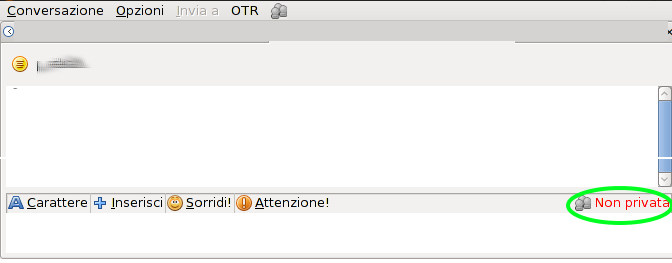
The label should at this point change to “unverified”.
Verification is essential: without it, the security achieved is not particularly better than without otr. It must therefore be carried out carefully and not superficially.
The methods that seem most practical to us are the “shared secret” and manual verification of the fingerprint.
Note that not all software supports the shared secret (pidgin and jitsi support it, adium does not), whereas all software that includes otr has fingerprint verification.
Click on “unverified”, then on “authenticate contact”
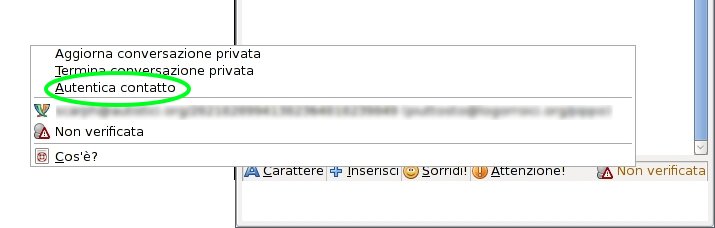
From here follow the instructions for one of the following methods, whichever you prefer.
If you can meet in person before the chat, exchange a small secret: even a not particularly difficult word will do, but it is important that it is exchanged secretly. For example whispering it in each other’s ear is fine, but saying it over the phone is not
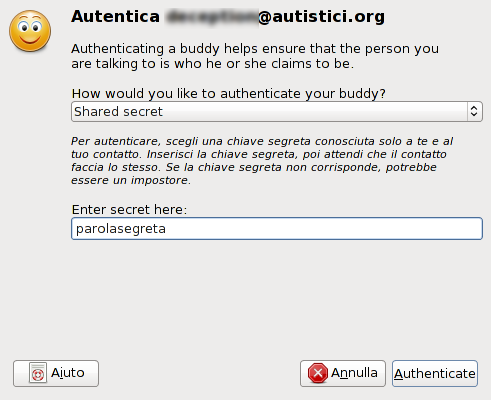
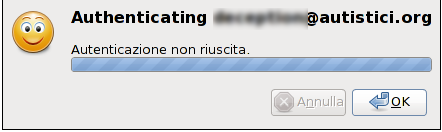
At that point choose the “shared secret” method and type the secret. If the two parties have written the same thing, a success message will appear and the conversation will become Private. Otherwise an error message will appear; this could be a genuine mistake or an interception attempt. Judge for yourselves whether to try again, but do not overdo it: a high number of attempts also means a high probability of success for the attacker!
This method seems harder but it has advantages: the fingerprint is an “identifier” and it is public. It is therefore perfectly acceptable to read it out over the phone without any secrecy. It is important, however, to “authenticate” whoever is reading it out, for example by their tone of voice. An SMS is therefore not suitable.
Another advantage is that no “prior” contact is needed; a typical case is that at the start of a chat you call each other on the phone, chat a little in order to recognise the person at the other end, and then each reads out their own fingerprint, carefully checking the other’s.
This is not really a method, but one further trick to simplify the methods already shown.
The assumption is that the 2 people have already securely verified each other’s gpg keys.
In this case each party can send a signed email (not necessarily encrypted, but signed yes!) containing their own fingerprint to the other.
When you receive an email, you have to check:
1. whether the email is correctly signed
2. whether the fingerprint it contains matches the one shown in the authentication panel.