Restored from the project wiki (we.riseup.net), which is no longer online.
All modern browsers support “Private browsing”, sometimes also called Incognito mode.
This is a browser mode in which passwords, history, logins and temporary files are not saved…
It is therefore very handy if you are using a computer that is not your own, or to be sure you are not leaving traces of a particular browsing session.
Careful! private browsing does not make your communication with websites any less interceptable: it only avoids leaving traces on the computer. It is therefore in no way comparable to using TOR or VPN.
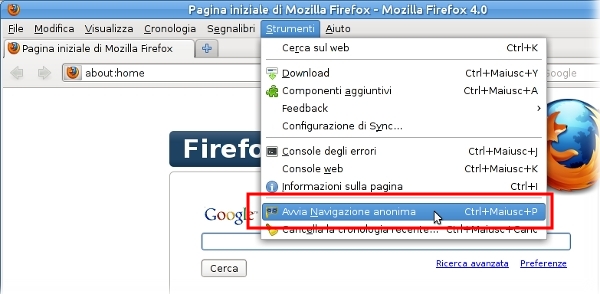
In firefox you need to go to tools→start private browsing.
At this point all open pages will “disappear” and private mode will begin. When you stop it (tools→stop private browsing) your previous content will reappear.
NOTE: bookmarks, even those saved during private browsing, stay saved.
In chrome, from the menu you can choose “new incognito window”: this will open a NEW window, in which to browse without leaving traces. The previous one, instead, corresponds to “normal” mode.
The latest version of IE supports InPrivate, essentially similar to the other browsers. Further instructions