Restored from the project wiki (we.riseup.net), which is no longer online.
Inside our hard disk, every file has meta-information associated with it that allows it to be accessed quickly and in an organised way. When you ask for a file to be deleted, for reasons of efficiency only the meta-information is removed, not the actual content. This data therefore remains stored on our hard disk even though it is no longer directly accessible.
To delete a file securely you need to use specific tools. These tools overwrite the contents of the file several times before deleting the associated meta-information. To prevent the data from being recoverable, a number of overwrites (“passes” in the jargon) are performed. Below are some of the tools available in Freepto and in GNU/Linux distributions.
A note: until a few years ago it was thought necessary to do a great many passes in order to be secure. In fact, with recent hard disks, this need has gone away, and a single pass is therefore enough.
All GNU/Linux distributions include several pieces of software for securely deleting files. Some tools are graphical, others are accessible from the command line.
Inside Freepto both the command-line tools and one tool accessible through the graphical interface are available. To delete a file securely, you need to browse to your directories and select the “secure deletion” entry from the menu that opens when you right-click on the file.
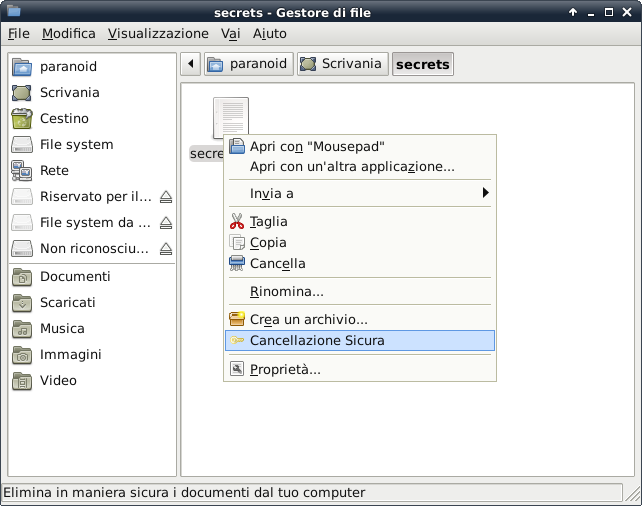
There are several tools that let you securely delete data from your hard disk. As far as GNU/Linux environments are concerned, we can mention:
To install secure-delete on your Ubuntu (or Debian and derivatives) GNU/Linux distributions you can type the command
apt-get install secure-delete
To delete a file
srm myfiles
To delete a directory
srm -r myfiles/
Some options of the program that may be useful:
* -f modalità veloce (fast) e insicura. Non utilizza /dev/urandom, e non scrive i dati in maniera sincrona.
* -l modalità meno sicura (solamente due passate sul contenuto dei files; e' comunque adatta!)
* -l se aggiunto una seconda volta, esegue solamente una passata casuale sul contenuto del file
* -r modalità ricorsiva: cancella anche le sottodirectory
* -v modalità verbosa
To install wipe on your Ubuntu (or Debian and derivatives) GNU/Linux distributions you can type the command
apt-get install wipe
To delete a file
wipe myfiles
To delete a directory
wipe -r myfiles/
Some options of the program that may be useful:
* -f non richiede alcuna domanda prima di cancellare il file
* -l modalità meno sicura (solamente due passate sul contenuto dei files)
* -Q <numero> imposta il numero di passi da eseguire per la cancellazione sicura
* -r modalità ricorsiva: cancella anche le sottodirectory
* -v modalità verbosa